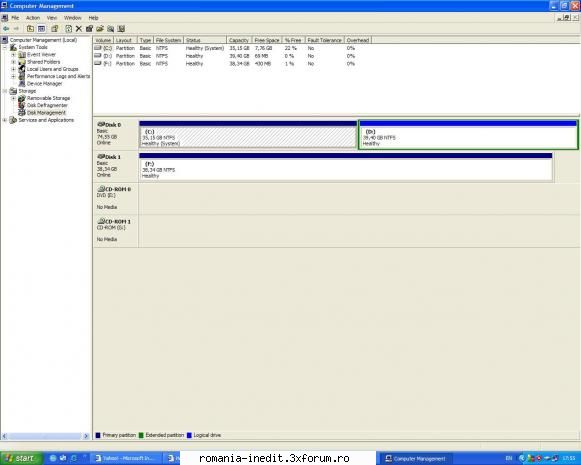
Tocmai mi-am luat un HD extern Verbatim de 500 GB, care avenit cu un cablu USB 2.0. Am instalat pe computer Windows XP si am 2 harduri interne, unul avand partitiile C si D (primul hard) si respectiv F (al doilea). Cand conectez hardul, imi apare "Found new hardware", led-ul hardului se aprinde, dar nu il vad in My Computer si nu-l pot accesa. Daca intru in Computer Management-Disk Management vad doar partitiile vechi - C, D, F. Cand folosesc stick usb nu am nici o problema, il vede ca H. In instructiunile lui scrie ca e compatibil cu orice tip de Windows si cu porturi de tip 1.1. si 2.0.
Poate fi cablul de vina, sau mai exista posibilitatea ca hardul respectiv sa nu fie semnat digital (in acest caz win nu il recunoaste ),astfel incat,sa fie necesara instalarea unui driver!Incearca o instalare de driver intai si dupa aceia spune ce se intampla!
_______________________________________ Auto-respectul este piatra de termelie a virtutii.
Multumesc ptr raspunsuri, insa n-am rezolvat problema. E formatat si are 2 partitii. Am incercat pe alte 3 computere, 2 la servici si unul al unui prieten, care il vad, chiar am pus date pe el, doar al meu nu il vede.
Am folosit acelasi cablu, cel original, iar usb-ul la computerul meu e ok, pentru ca am incercat cu un usb stick si cu cablul usb al digicam-ului. Cand il conectez, imi apare in dreapta jos mesajul "Found new hardware", care imi dispare in scurt timp, iar in My Computer nu apare.
usb-ul de la calculatorul tau sigur e 2.0 si nu 1.1? unele device-uri noi ( majoritatea ) vor doar usb 2.0 , pe 1.1 refuza sa functioneze...
_______________________________________ Zilnic, cel mai interesant P.M. este răsplătit cu un BONUS special DO NOT PM ME, MOST LIKELY I WON'T ANSWER.DO NOT REQUEST REUPLOADS OF MY PREVIOUS UPLOADS, BUT IF YOU STILL HAVE THEM, FEEL FREE TO MAKE AS MANY MIRRORS AS YOU LIKE. [mp3=https://www.youtube.com/watch?v=azJTTI4vk7g]
de fiecare data cand il conectezi la pc apare "new hardware found"?
in device manager iti apare semnul intrebari (unknown device)?
am avut o problemaa cu un usb stick care nu-mi aparea in "my computer", adica in explorer-ul de la windows dar in "total commander" aparea. daca totul e ok in device manager, incearca odata cu total commander
Click Dreapta pe My Computer Du-te la "Storage" - "disk Management" Selecteaza litera drive-ului si schimb-o cu oricare alta litera care nu este data in folosinta deja , oricare in afara de B si Z...spune-mi daca a functionat , solutia am gasit-o cautand pe google...
_______________________________________ Zilnic, cel mai interesant P.M. este răsplătit cu un BONUS special DO NOT PM ME, MOST LIKELY I WON'T ANSWER.DO NOT REQUEST REUPLOADS OF MY PREVIOUS UPLOADS, BUT IF YOU STILL HAVE THEM, FEEL FREE TO MAKE AS MANY MIRRORS AS YOU LIKE. [mp3=https://www.youtube.com/watch?v=azJTTI4vk7g]
salut cam aceasi problema am si eu.tocmai mi-am cumparat un hdd HITACHI de 1 TB SATA intern si, nu il vad in My computer,insa la Device manager el imi apare.am cautat pe site-ul celor de la hitachi, insa nu miam gasit hardul si mi-a aparut si Found new hardweare ala cand an bagat hardul prima oara, si acum imi apare in continuare la DEVICE MANAGER . pls help !!! am windows xp sp3
poti folosi fix-it sau daca vrei sa faci manual expandezi rubrica:
Let me fix it myself
care spune
"However, serious problems might occur if you modify the registry incorrectly. Therefore, make sure that you follow these steps carefully. For added protection, back up the registry before you modify it. Then, you can restore the registry if a problem occurs. For more information about how to back up and restore the registry, click the following article number to view the article in the Microsoft Knowledge Base: 322756 How to back up and restore the registry in Windows To fix this problem, delete the UpperFilters registry value and the LowerFilters registry value. These values may cause access problems. To do this, follow these steps: Click Start, click Run, type regedit, and then click OK. Locate and then click the UpperFilters registry value. This value is located in the following registry subkey: HKEY_LOCAL_MACHINE\SYSTEM\CurrentControlSet\Control\Class\{4D36E967-E325-11CE-BFC1-08002BE10318} On the Edit menu, click Delete, and then click OK.
Note If you receive an error when you try to delete the registry subkey, you may not have appropriate permissions to edit the subkey. For more information about how to set or change registry editing permissions, click the following article number to view the article in the Microsoft Knowledge Base: 310426 How to set or change registry editing permissions in Windows XP or in Windows Server 2003 Locate and then click the LowerFilters registry value. This value is located in the following registry subkey: HKEY_LOCAL_MACHINE\SYSTEM\CurrentControlSet\Control\Class\{4D36E967-E325-11CE-BFC1-08002BE10318} On the Edit menu, click Delete, and then click OK.
Note If you receive an error when you try to delete the registry subkey, you may not have appropriate permissions to edit the subkey. For more information about how to set or change registry editing permissions, click the following article number to view the article in the Microsoft Knowledge Base: 310426 How to set or change registry editing permissions in Windows XP or in Windows Server 2003 Exit Registry Editor. Restart the computer. Note If you remove both registry values, and then you lose functionality in a particular program such as CD recording software, you may have to reinstall that software. If this problem occurs again, contact the software vendor for help. For information about how to contact Apple Computer, Inc., visit the following Microsoft Web site: Hardware and software vendor contact information Microsoft provides third-party contact information to help you find technical support. This contact information may change without notice. Microsoft does not guarantee the accuracy of this third-party contact information."
Click Dreapta pe My Computer Du-te la "Storage" - "disk Management" Selecteaza litera drive-ului si schimb-o cu oricare alta litera care nu este data in folosinta deja , oricare in afara de B si Z...spune-mi daca a functionat , solutia am gasit-o cautand pe google...
Dupa cateva ore de incercari cu HDD-ul meu, am gasit postarea ta si a mers, merci !










 si mi-a aparut si Found new hardweare ala cand an bagat hardul prima oara, si acum imi apare in continuare la DEVICE MANAGER . pls help !!! am windows xp sp3


