iGO My way 2009 iPhone All Maps Europe Release 06 Crypton - 27.AUG.2010 | 7.20 GB
iGO - Revolutionary Navigation Program c 3D, calculated on all users of iPhone 3G, 3GS. The main feature of iGo My way for iPhone - this is a three-dimensional modeling of terrain and buildings of architectural monuments. The program allows you to rotate the map 360 degrees for more convenient display on the screen of your phone. You can also mention the possibility of using the navigation outside of public roads, on bikes, snowmobiles, motorcycles, on yachts, boats, hiking and so on.
iGO My way 2009 iPhone All Maps Europe Release 06 Crypton - 27.AUG.2010 iGO My way 2009 iPhone 1.1 TopMap 2010.03 - Maps/Pois released on 20.MAY.2010 iGO My way 2009 iPhone 1.1 Navteq 2010.Q1 - Maps/Pois released on 15.JULY.2010 iGO My way 2009 iPhone 1.1 TeleAtlas 2010.06 - Maps/Pois released on 16.JULY.2010 iGO My way 2009 iPhone 1.1.1 Mixed 2009.06 - Maps/Pois released on 30.JUL.2009
If you don't have enough space on your iPhone to install all of them then I recommend installing at least "iGO My way 2009 iPhone 1.1 TopMap". I prefer to install them all to be sure that I have with me all the possible maps.
All the packages contain the Skin English Sbertaud13 iPhone V7.0 EUR+ that has Speedcams activated.
Speedcams from 15.AUGUST.2010.
Lots of color schemes were included.
Only English and Romanian voices and languages are included. The speedcams alerts are in French.
How to install IPA?
Doing this is as simple as double clicking the downloaded .ipa file and syncing it with your device through iTunes. As soon as you press Sync, the installation is started. No need to say that you need a jailbroken iphone.
What is new?
Release 06: - New Maps/Pois Navteq 2010.Q1 released on 15.JULY.2010 - New Maps/Pois TeleAtlas 2010.06 released on 16.JULY.2010 - Navteq and TeleAtlas Maps/Pois updated in the TopMap package - New Speedcams 15.AUGUST.2010 - Downgrade to an old skin because Find Places was not working with the last skin version.
Release 05: - New Maps/Pois Navteq 2010.Q1 released on 22.JUNE.2010,09.JULY.2010 and 14.JULY.2010 - Navteq Maps/Pois updated in the TopMap package - New buildings in all packages
Release 04: - New buildings in all packages - New color schemes in all packages - New voice files EN & RO in all packages - New language files EN & RO in all packages
Release 03: - New Maps/Pois TopMap 2010.03 released on 19-20.MAY.2010 - New Maps/Pois Navteq 2009.Q4 released on 27.APR.2010
Release 02: - New Maps/Pois TeleAtlas 2010.03 released on 26.MAY.2010 - New color schemes in all packages - New Speedcams from 08.JULY.2010
_______________________________________ Wayteq 920bt Navngo Igo8.3.4.117940 GJ6.12p_da by D.I.I. Multumiri lui DII si mai ales lui Irinuca. iPhone 3G, cu multumiri lui Istudor. Nu fura !...Guvernul nu agreaza concurenta...
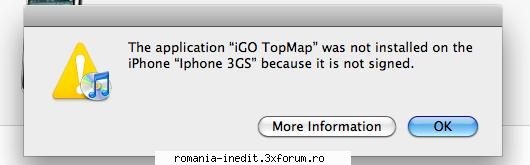
Am descarcat si am incercat sa instalez dar imi spune ca aplicatia nu este instalata in iPhone deoarece "it is not signed". Ma poate ajuta cineva cu un sfat? Recunosc ca sunt un amator in treburile astea. Device: iPhone 3GS cu JB.
iPhone GPS Applications – poza de teodosie, in GPS Maps & Mapping - Download · 15.7KB
Am descarcat si am incercat sa instalez dar imi spune ca aplicatia nu este instalata in iPhone deoarece "it is not signed". Ma poate ajuta cineva cu un sfat? Recunosc ca sunt un amator in treburile astea. Device: iPhone 3GS cu JB.
Salut. Asta inseamna ca nu e facut jb/facut cum trebuie -> ca daca ar fi facut bine nu ar ma trebui "sa verifice semnatura" Mai fa odata jb
_______________________________________ Baietii vor fi baieti...
Am descarcat si am incercat sa instalez dar imi spune ca aplicatia nu este instalata in iPhone deoarece "it is not signed". Ma poate ajuta cineva cu un sfat? Recunosc ca sunt un amator in treburile astea. Device: iPhone 3GS cu JB.
_______________________________________ Wayteq 920bt Navngo Igo8.3.4.117940 GJ6.12p_da by D.I.I. Multumiri lui DII si mai ales lui Irinuca. iPhone 3G, cu multumiri lui Istudor. Nu fura !...Guvernul nu agreaza concurenta...
iGO My Way 1.2.2 for the iPhone / iPod touch / iPad + Maps of Europe and Russia | 1.97 GB
iGO My way for the iPhone - a modern and justified choice. Attachment can easily use even by people without experience with GPS-navigation. Combines the most useful and necessary functions and capabilities. Equipped with so-called "smart" functions. IGO My way to easily calculate the route to any destination with a perfect three-dimensional graphics, clear visual cues and precise voice instructions. Be sure you have selected the correct route and expand 3G/3GS-vozmozhnosti your iPhone. Year: 2010 Version: v 1.2.2 Developer: Igomyway Platform: Compatible with iPhone, iPod touch, and iPad. Requires iPhone OS 3.0 or later. + Required dzhelbreyk.
System requirements: Firmware 3.0 or higher (Compatible with iPhone, iPod touch, and iPad. Requires iPhone OS 3.0 or later.
IMPORTANT: Before installing this version, you must remove the old version, if it was installed.
Key features: - Navigating the iPhone contacts - Find POI («Places" - Manage your music - Support multitochechnogo route - QWERTY keyboard - 3D-landmarks - 3D-decoupling - Smart Keyboard - Support of lanes and realistic pointers - Resumption of navigation after the incoming call - Function "Where am I?" For emergencies - Auto Adjust Time Zone - Avtoorientatsiya (vertical horizon). - "Images of the car" (the choice of 3D-model car) - Traffic signs for a specific country - Display next 2 exercises - Direct navigation across borders and maps - Route Overview - Avtopereraschet route - Exclusion of certain types of roads (speed, pay, groundwater) - POI search through the entire route - Unlimited Favorites - Mode "Tunnel" - Notification of speeding - Quick, short, economical and simple route - Comparison of possible routes on the map - Journal of routes - Download / study cards - Automatic mode Day / Night - Simulating the route
Advantages: - Permanent license (WordWide) - Added latest new "maps, 3D buildings, 3D Landscape, POI and Radars" - Maps from different manufacturers (Tele Atlas, OSM, MMCN, GPSandMore, Contrast, Emapa, CEDA, Monolit, Bazarsoft, Carteblanche, Epsilon, Regeo etc. ..) - Maps are included in the application, navigation is not dependent on mobile network coverage. - No roaming charges, works everywhere. - Added a very nice skin (sk_Russian_Sbertaud13_4.2 on "90% Russianize + Russian озвучка radar + Themes)
Changes in the skin: - Russia (MAP - "Russia83TA_2009.12_100312" - 3D buildings Russia ("Russia83TA_2009.12.3dl" - POI for Russia ("Russia83TA_2009.12.poi" - Radars (Russia - "RU_Speedcams_v50_322_1687_521" and Kyrgyzstan, Kazakhstan - "K_Kspeedcam" - For all the countries have been added radar ..
EURO V4.4 + - New icons Chambers warning - Full optimization of the new code radar - When triggered warnings, the lower part of the image gray color (black in night mode) - Technical repairs
EURO V4.3 + - Fixed error output for routing - New icons radar (Cdkbzh) - Greater transparency of icons radar in 3D! mode - Larger size of icons radar - If you do not like it - you can return to your old (folder ui_igo_iphone (is in the archive with skin) you want to - / private / var / mobile / Applications / xxxxx-xxxxx-xxxx-xxxx-xxxxxxxxxxxx / iGO_Myway.app - Added parameter control angle maps in navigation mode
EURO V4.2 + - Type 14 is STOP - Type 20 is a user type 20: zone of tolerance. - Opaseye site 10: this type can now declare three types: Danger Zone dangerous intersections and dangerous roundabouts. - Change the folder Audio. - The sound of keys \ no sounds radar - Copy the wav files in Audio + "Sons of keys / radar" checked + "warning voice" = Off - The sound of keys and the sound of radar - Copy the wav files in Audio + "Sons of keys / radar" checked + "warning voice" = Claire and Bruno - Lack of key sounds \ absence of sounds radar - Do not copy the audio in wav + "Sons of keys / radar" unchecked - No key sounds \ noises radar - Do not copy the audio in wav + "Sons of keys / radar" checked + "warning voice" = Claire and Bruno - Full support РОІ 2009/Q3 - Full support for Text-to-Speech (TTS) ENG (UK), SP, FR, IT, GER, PT and phonemes - Enhanced functions route - Empowerment of navigation in the "Pedestrian" - To show 4 fields of information, including current speed mode maps - Significant visual improvement \ change - Support TTS HQ
- For the radar - Type 20 Type 24. You can place an image of your choice, which will be displayed during the operation radara.Maks Size: 60x60, throw in a folder GFX (create it if necessary) should be located in the root folder of Amigo. Add to your file sys.txt:
- For the alarm clock, in the folder Audio (voice_male or voice_male), 5 types of sounds to choose from WAV user_alert20.wav, user_alert21.wav, user_alert22.wav, user_alert23.wav et user_alert24.wav You can independently create the sounds of your choice in WAV format, replacing the existing
_______________________________________ Wayteq 920bt Navngo Igo8.3.4.117940 GJ6.12p_da by D.I.I. Multumiri lui DII si mai ales lui Irinuca. iPhone 3G, cu multumiri lui Istudor. Nu fura !...Guvernul nu agreaza concurenta...
Magellan RoadMate 2010 North America 1.2 -IGO CLONE Requirements:iPhone 3G OS and later. Operating System:iPhone 3G and 3GS with 3.0 Firmware only. It will NOT work with iPhone 2G. Overview:The Magellan RoadMate App for iPhone is designed to let you use your iPhone 3G/3GS as a personal navigation device. It is a powerful app that will navigate you through your daily routes with ease. The app includes many premium features including OneTouch favorites, highway lane assist, spoken street names and more.
_______________________________________ Wayteq 920bt Navngo Igo8.3.4.117940 GJ6.12p_da by D.I.I. Multumiri lui DII si mai ales lui Irinuca. iPhone 3G, cu multumiri lui Istudor. Nu fura !...Guvernul nu agreaza concurenta...
Am facut o cominatie din softul 1.2.2 dat de Istudor mai sus si ultimile harti si ,merge Ok!
_______________________________________ Wayteq 920bt Navngo Igo8.3.4.117940 GJ6.12p_da by D.I.I. Multumiri lui DII si mai ales lui Irinuca. iPhone 3G, cu multumiri lui Istudor. Nu fura !...Guvernul nu agreaza concurenta...
Stie cineva cum se introduc punctele intermediare in iGO 1.2.2 ? (imi apare fereastra cu introducerea punctului intermediar dar nu se poate activa nimic apoi)
REQUIREMENTS: Compatible with iPhone, iPod touch, and iPad. Requires iPhone OS 3.0 or later Description Sygic Aura is the professional turn-by-turn car navigation app, that changes everything.
“Sygic Aura – the next-generation satnav app – got released into the wild.” – IntoMobile
FEATURES:
- Maps from Tele Atlas stored on the phone - 3D view of cities and landscape - Road incident sharing and real-time notifications - Speed camera warnings - Lane Assistant and Signposts
- Car audio integration using bluetooth or cable - Automatic screen rotation using accelerometer - Compass-assisted direction detection - Multitouch support for easier map browsing - Hardware accelerated 3D rendering
- 37 languages - Intuitive interaction with points of interest - Friends on the map - City guides from premium providers and from Wikipedia
- Free app updates - Free speed camera updates
- Vote for new features at feedback.sygic.com
Maps included: Italy, Malta, San Marino, Vatican.
Cities with 3D coverage: Italy: Ancona, Bari, Bologna, Brescia, Catania, Florence, Genoa, Milan, Naples, Palermo, Pisa, Ravenna, Rimini, Rome, Turin, Venice, Verona.
City guides available: Italy: Bologna, Florence, Genoa, Milan, Palermo, Rome, Rimini, Turin, Venice, Verona.
Sygic Aura is the professional turn-by-turn car navigation app, that changes everything.
Note: Continued use of GPS running in the background can dramatically decrease battery life.
What's new in Version 2.0 - Support for Retina display and iPad display - iOS3 support for iPhone 3G and for iPad - Native iPhone keyboard - Multitasking - New Battery management settings to define GPS connectivity during multitasking - Optimized user interface and menus
- Multi-stop route planning with interim destinations to travel via - Traveled routes statistics and altitude profiles in new Travel Book - New stopwatch in walk mode
- Speed camera alerts also when no route is planned - Bigger Lane assistant with better contrast - Direct search for points of interest without knowing the category - Direct street entry without the need to know the name of the city or suburb in which the street is located - Intelligent recognition of a desired route when not adherring to originally planned route - Home address
- Option to switch off Auto-zoom - Fast access to Route summary - Improved first run wizard - Easier user registration
- Add item from history to Favorites directly - Add and manage Favorites easily - Delete addresses assigned to contacts - Delete messages
REQUIREMENTS: Compatible with iPhone, iPod touch, and iPad. Requires iOS 3.0 or later Description Sygic Aura is the professional turn-by-turn car navigation app, that changes everything.
“Sygic Aura – the next-generation satnav app – got released into the wild.” – IntoMobile
FEATURES:
- Turn-by-Turn navigation with voice guidance - LATEST maps from Whereis stored on the phone - FREE map updates
- 3D view of cities and landscape - Real-Time Traffic (available as a subscription service at Code: www.sygic.com/shop ) - Spoken street names - Road incident sharing and real-time notifications - Speed camera warnings - Lane Assistant and Signposts
- Car audio integration using bluetooth or cable - Automatic screen rotation using accelerometer - Compass-assisted direction detection - Multitouch support for easier map browsing - Hardware accelerated 3D rendering
- 37 languages - Intuitive interaction with points of interest - Friends on the map - City guides from premium providers and from Wikipedia
- Vote for new features at feedback.sygic.com
Maps included: Australia, New Zealand. Cities with 3D coverage: Australia: Brisbane, Melbourne, Perth, Sydney. New Zealand: Auckland, Wellington. City guides available: Australia: Adelaide, Brisbane, Canberra, Hobart, Melbourne, Perth, Sydney. New Zealand: Auckland, Christchurch, Wellington.
Sygic Aura is the professional turn-by-turn car navigation app, that changes everything.
Note: Continued use of GPS running in the background can dramatically decrease battery life.
What's new in Version 2.0 - Latest available Whereis maps, speed limits and speed cameras - Support for Retina display and iPad display - iOS3 support for iPhone 3G and for iPad - Native iPhone keyboard - Multitasking - New Battery management settings to define GPS connectivity during multitasking - Optimized user interface and menus - Five Australian voices for spoken street names: Kate, Grace, Steven, Dave, Simon
- Real-Time Traffic (available as a subscription service at Code: www.sygic.com/shop ) - Multi-stop route planning with interim destinations to travel via - Traveled routes statistics and altitude profiles in new Travel Book - New stopwatch in walk mode
- Speed camera alerts also when no route is planned - Bigger Lane assistant with better contrast - Direct search for points of interest without knowing the category - Direct street entry without the need to know the name of the city or suburb in which the street is located - Intelligent recognition of a desired route when not adherring to originally planned route - Home address
- Option to switch off Auto-zoom - Fast access to Route summary - Improved first run wizard - Easier user registration
- Add item from history to Favorites directly - Add and manage Favorites easily - Delete addresses assigned to contacts - Delete messages
Multumesc, interesant. Pun la colectie ca nu se stie,
_______________________________________ Wayteq 920bt Navngo Igo8.3.4.117940 GJ6.12p_da by D.I.I. Multumiri lui DII si mai ales lui Irinuca. iPhone 3G, cu multumiri lui Istudor. Nu fura !...Guvernul nu agreaza concurenta...
iGO My way 2009 iPhone All Maps Europe Release 08 Crypton - 14.DEC.2010 Requirements: iPhone Operating System: iOS
Overview: iGO My way 2009 iPhone 1.1.1 TopMap 2010.07 - Maps/Pois released on 12.AUG.2010 iGO My way 2009 iPhone 1.1.1 Navteq 2010.Q2 - Maps/Pois released on 12.AUG.2010 iGO My way 2009 iPhone 1.1.1 TeleAtlas 2010.06 - Maps/Pois released on 16.JULY.2010
If you don't have enough space on your iPhone to install all of them then I recommend installing at least "iGO My way 2009 iPhone 1.1.1 TopMap". I prefer to install them all to be sure that I have with me all the possible maps.
All the packages contain the Skin English Sbertaud13 iPhone V7.0 EUR+ that has Speedcams activated.
Speedcams from 15.AUGUST.2010.
Lots of color schemes are included.
Only English and Romanian voices and languages are included. The speedcams alerts are in French.
How to install IPA?
Doing this is as simple as double clicking the downloaded .ipa file and syncing it with your device through iTunes. As soon as you press Sync, the installation is started. No need to say that you need a jailbroken iphone.
What is new?
Release 08: - Upgrade all packages from 1.1 to 1.1.1 - Fix Find Places in TopMAP and TeleAtlas Packages
Release 07: - New Maps/Pois TopMap 2010.07 released on 12.AUG.2010 - New Maps/Pois Navteq 2010.Q2 released on 12.AUG.2010 - Navteq Maps/Pois updated in the TopMap package
Release 06: - New Maps/Pois Navteq 2010.Q1 released on 15.JULY.2010 - New Maps/Pois TeleAtlas 2010.06 released on 16.JULY.2010 - Navteq and TeleAtlas Maps/Pois updated in the TopMap package - New Speedcams 15.AUGUST.2010 - Downgrade to an old skin because Find Places was not working with the last skin version.
Release 05: - New Maps/Pois Navteq 2010.Q1 - 22.JUNE.2010,09.JULY.2010 and 14.JULY.2010 - Navteq Maps/Pois updated in the TopMap package - New buildings in all packages
Release 04: - New buildings in all packages - New color schemes in all packages - New voice files EN & RO in all packages - New language files EN & RO in all packages
Release 03: - New Maps/Pois TopMap 2010.03 released on 19-20.MAY.2010 - New Maps/Pois Navteq 2009.Q4 released on 27.APR.2010
Release 02: - New Maps/Pois TeleAtlas 2010.03 released on 26.MAY.2010 - New color schemes in all packages - New Speedcams from 08.JULY.2010
Multumesc, am vazut ca deja a aparut 1.2.3, il are cineva/
_______________________________________ Wayteq 920bt Navngo Igo8.3.4.117940 GJ6.12p_da by D.I.I. Multumiri lui DII si mai ales lui Irinuca. iPhone 3G, cu multumiri lui Istudor. Nu fura !...Guvernul nu agreaza concurenta...
Nu mai aveti ceva nou pentru iPhone? Va multumesc.
_______________________________________ Wayteq 920bt Navngo Igo8.3.4.117940 GJ6.12p_da by D.I.I. Multumiri lui DII si mai ales lui Irinuca. iPhone 3G, cu multumiri lui Istudor. Nu fura !...Guvernul nu agreaza concurenta...